Using the Invitrogen™ RNAi Tool
This tool helps researchers find and order predesigned RNA interference (RNAi) reagents for gene knockdown studies in human, mouse, or rat species. The tool provides access predesigned siRNA and miRNA mimic and inhibitors making it easy to identify RNAi reagents for your specific research application.
Access the Tool
- Direct link: Invitrogen™ Custom RNAi Tool
- Note: If using the link above and a gray box is observed, scroll to the bottom of the page to accept or decline cookies
- From the Fisher Scientific website:
- Go to https://www.fishersci.com/
- Select Tools from the upper-left navigation menu.
- Under Oligos Tools, select Invitrogen™ Custom RNAi Tool.
How to Use the Tool
- Start Your Search
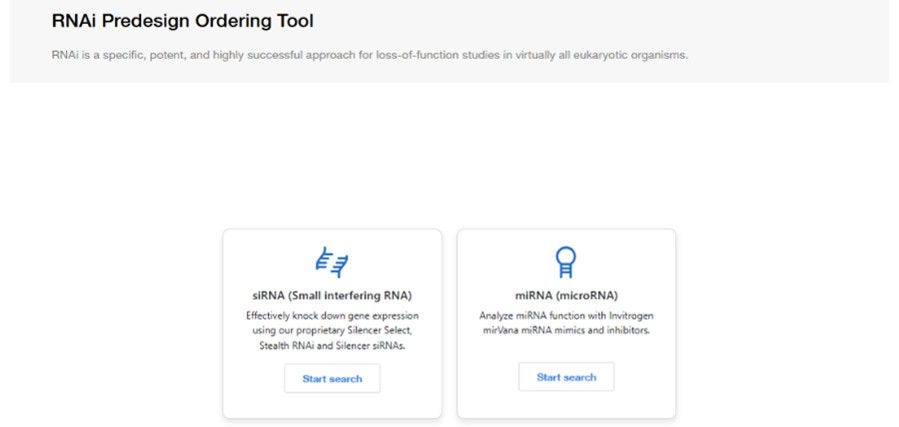
- Select siRNA/miRNA selection tool to launch the RNAi ordering portal.
- Choose Your RNAi Product
- Select the RNAi technology that best fits your experiment, either siRNA (small interfering RNA) or miRNA (microRNA)
- Select the product type needed such as: Silencer™ Select siRNA, Ambion In Vivo siRNA, Silencer™ siRNA, or Stealth RNAi™ siRNA if siRNA is selected or mirVana™ miRNA Mimic or Inhibitor, Pre-miR™ miRNA Precursor Anti-miR miRNA Inhibitor if miRNA is selected.
- Select the species to search targets in (Optional).
- Enter Target Information
- For siRNA, search using one of the following: Gene Symbol, Gene Name, Entrez Gene ID, GenBank® Accession Number, Existing Assay ID.
- Note: if providing an Assay ID, the Product Type and species must match the design details to find results. If an Assay ID is provided, it may be best to not select the Product Type nor species.
- For miRNA, search using one of the following: miRBase ID, miRBase Accession Numbers, Stem-loop IDs, Stem-loop Accession Numbers, Existing Assay ID.
- Note: if providing an Assay ID, the Product Type and species must match the design details to find results. If an Assay ID is provided, it may be best to not select the Product Type or species.
- Alternatively, miRNA sequences can be searched by selecting Sequences under How do you want to search miRNA and pasting the sequence in the open text box under Enter Sequence.
- Once the details have been entered, press Search.
- For siRNA, search using one of the following: Gene Symbol, Gene Name, Entrez Gene ID, GenBank® Accession Number, Existing Assay ID.
- Review Available Designs
- At the top of the results above the filters, move between Product Types and view other predesigns available for those specific Product Types.
- Expand Read about these products on the right to view more details about the Product Types and their usage applications.
- Above the Product Type is the Performance Guarantee that is specific to the Product Type.
- Review the available predesigned RNAi options.
- Designs can be filtered by species, gene symbol, transcript type and validation status at the top of the predesign result list.
- All available predesigns will include the Assay ID specific to the design, Gene symbol, the number of transcripts targeted, the Species, Transcript Type and Product Type
- Each predesign will include more information under View details, including the gene details, chromosome location, and transcripts targeted.
- Under the Genomic Map dropdown, the targeted transcript location of the siRNA can be viewed, along with all other existing predesigns.
- Validated designs will be filtered to the top of the results and denoted by a green star Validated symbol . To review the validation experimental details and results, expand the Validation Data tab below the specific Assay ID.
- If multiple RNAi sequences are available, compare their designs before making your selection by clicking the check box next to the Assay IDs you would like to compare and scrolling to the bottom to select Compare
- The selected designs can also be Emailed or Exported to a csv.
- At the top of the results above the filters, move between Product Types and view other predesigns available for those specific Product Types.
- Configure Your Order
- Depending on the Assay ID selected, configure Specifications including Purification and Size.
- Some products may allow additional sequence modifications
- Review Your Order
- Before adding an assay ID to your cart, verify: Correct target gene, Species, Product Type, Purification, Size.
- Add to Cart
- Select Add to Cart.
- Add any positive or negative controls by expanding the Recommended Controls tab under each assay ID (Optional)
- Additional Recommended Products, including Transfection Reagents, Related qPCR Assays, Related Antibodies and Kits, can be found by expanding that tab and can be added to cart (Optional).
- Continue shopping or proceed to checkout.
- Complete your purchase through Fisher Scientific.
Helpful Tips
- If searching an Assay ID, it may be best to not select the Product Type or Species.
- Include positive and negative control reagents when planning RNAi experiments.
- Review transcript information carefully if targeting specific splice variants.
- If predesigned reagents are unavailable, there may be a couple of reasons for this:
- It may exist under a different product line. Please navigate to other Product Type tabs to view siRNAs of different product types.
- The siRNA is listed under an alternate gene name. Try searching for synonyms or by NCBI Gene ID.
- Spelling or typing errors. You can use the search bar above to modify your search.
- The search term you entered does not match the species or product type that you selected. Note that you do not need to select a species or product type to search.
- If we do not have a predesigned siRNA for your target, we can design a Custom siRNA for you using the GeneAssist Custom siRNA Builder or BLOCK-iT RNAi Designer.
- Save your configuration if you plan to return and modify your order later.
Frequently Asked Questions
Can I search for predesigned siRNAs?
Yes. The tool includes a large database of validated predesigned siRNA and miRNA reagents for many genes and species.
What predesigned RNAi products are available?
Depending on your application, the configurator supports Silencer™ Select siRNA, Ambion In Vivo siRNA, Silencer™ siRNA, Stealth RNAi™, mirVana™ miRNA Mimics and Inhibitors, Pre-miR™ miRNA Precursor and Anti-miR miRNA Inhibitor
What if my gene isn't available?
If a predesigned reagent is not available, you can use the custom design workflow to create RNAi reagents for your gene or organism of interest.
Can I design a custom RNAi sequence?
Yes. You can design custom siRNA or Stealth RNAi™ reagents using your own sequence or target gene information using the Custom Design tools.
More Related Help Topics
Searching for Products
Getting Key Documents
Custom Search Tools
Still can’t find an answer?
Help is on the way! Click an option below to chat with support